
Introduction
Navigation is one of the most important skills every pilot student must learn. A pilot should always know where the aircraft is, where it is going, and how to stay on the correct route safely. In aviation, navigation is not only about looking outside or following a map. Pilots also use instruments, radio signals, charts, and navigation systems to maintain direction and position.
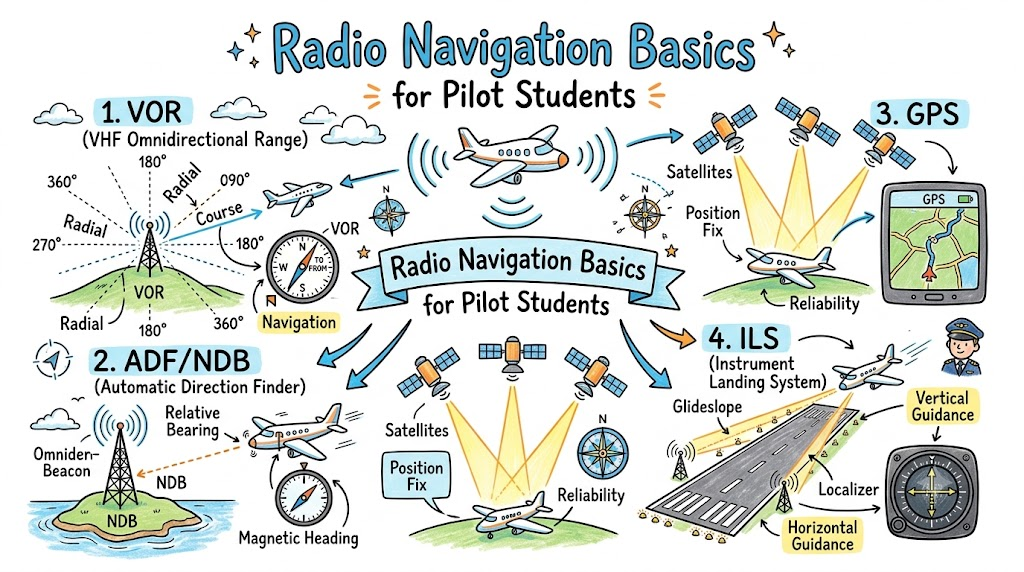
Radio Navigation Basics for Pilot Students is an essential topic because it helps beginners understand how aircraft use radio signals from ground stations and onboard equipment to navigate. Even though modern aircraft often use GPS, radio navigation remains an important foundation in pilot training, especially for instrument flying, backup navigation, and understanding traditional aviation systems.
This guide explains radio navigation in simple language for student pilots, aviation beginners, and future commercial pilot aspirants.
What Is Radio Navigation in Aviation?
Radio navigation is a method of finding an aircraft’s position and direction using radio signals. These signals usually come from ground-based navigation stations. The aircraft receives the signals through onboard navigation equipment, and the pilot reads the information on cockpit instruments.
In simple words, radio navigation helps a pilot answer questions like:
- Where am I?
- Am I flying toward the correct point?
- How far am I from a navigation station?
- Am I lined up correctly for an approach?
- Do I need to adjust my heading or course?
Radio navigation does not depend only on visual landmarks. This makes it useful when flying long distances, in poor visibility, above clouds, or during instrument training.
Why Pilot Students Must Learn Radio Navigation
Pilot students must learn radio navigation because it builds strong aviation awareness. A good pilot should not depend on only one navigation system. GPS is very useful, but traditional radio navigation helps pilots understand the basics of direction, tracking, distance, and approach guidance.
Radio navigation is important for student pilots because it supports:
- Cross-country flying: Helps pilots navigate between airports and checkpoints.
- Instrument training: Builds understanding of IFR navigation and approaches.
- Backup navigation: Helps if GPS becomes unavailable or unreliable.
- Situational awareness: Helps pilots confirm their position during flight.
- Cockpit discipline: Teaches frequency selection, instrument reading, and cross-checking.
- Professional pilot skills: Prepares students for advanced flight training.
Learning radio navigation also helps pilot students become more confident when reading aeronautical charts and using navigation instruments.
Basic Components of Radio Navigation
Radio navigation works through a combination of ground stations, aircraft equipment, frequencies, and cockpit displays. Student pilots should understand these basic components first.
| Component | Simple Explanation |
|---|---|
| Ground Navigation Station | A station on the ground that sends radio signals to aircraft |
| Aircraft Receiver | Equipment in the aircraft that receives navigation signals |
| Navigation Frequency | The radio frequency selected by the pilot to tune a station |
| Cockpit Indicator | Instrument that shows direction, course, or position information |
| Pilot Interpretation | The pilot’s ability to understand and use the displayed information |
| Aeronautical Chart | A chart that shows navigation aids, airways, airports, and routes |
A pilot does not simply tune a frequency and follow blindly. The pilot must identify the station, understand the instrument indication, compare it with the chart, and maintain good situational awareness.
Common Radio Navigation Systems Student Pilots Learn
Pilot students usually learn several radio navigation systems during training. Some are older, some are still widely used, and some are mainly important for understanding navigation concepts.
VOR – Very High Frequency Omnidirectional Range
VOR is one of the most common radio navigation systems taught to student pilots. A VOR station sends signals in all directions. These directions are called radials. A pilot can use VOR to track toward or away from a station.
VOR helps pilots understand:
- Direction from a station
- Course tracking
- TO/FROM indications
- Position awareness
- Airway navigation
For many students, VOR is one of the first serious radio navigation systems they practice.
NDB – Non-Directional Beacon
NDB is an older radio navigation system. It sends a signal in all directions, and the aircraft uses an ADF instrument to point toward the station.
NDB is less common in modern training than before, but it is still useful for understanding basic bearing and direction concepts.
ADF – Automatic Direction Finder
ADF is the aircraft instrument that points toward an NDB station. It helps the pilot know the direction of the beacon relative to the aircraft.
In simple terms, the ADF needle points toward the station. The pilot then interprets that direction along with heading, wind correction, and chart information.
DME – Distance Measuring Equipment
DME tells the pilot how far the aircraft is from a navigation station. The distance is usually shown in nautical miles.
DME is helpful because direction alone is not always enough. A pilot may know the aircraft is on a certain course, but DME adds distance information, which improves position awareness.
ILS – Instrument Landing System
ILS helps pilots line up with a runway during an instrument approach. It provides lateral and vertical guidance.
ILS has two main parts:
- Localizer: Helps the aircraft align with the runway centerline.
- Glide slope: Helps the aircraft follow the correct descent path.
For student pilots, ILS is usually studied during instrument training. It is one of the most important systems for learning precision approaches.
VOR Navigation Explained for Beginners
VOR navigation may sound technical at first, but the basic idea is simple. A VOR station works like a radio lighthouse. It sends signals in different directions, and each direction is known as a radial.
A radial is a line that extends outward from a VOR station. For example, the 090 radial extends east from the station, while the 270 radial extends west from the station.
A pilot uses cockpit instruments to know whether the aircraft is on the selected course or needs correction.
Important VOR terms include:
- Radial: Direction line extending from the VOR station.
- Course: The path the pilot wants to follow.
- CDI: Course Deviation Indicator, which shows if the aircraft is left or right of course.
- TO/FROM indicator: Shows whether the selected course leads toward or away from the station.
- OBS: Omni Bearing Selector, used to select a desired course.
For example, if a student pilot wants to fly toward a VOR station, they select the correct course, check the TO indication, and use the CDI to stay aligned. If the needle moves left or right, it means the aircraft is off course and needs correction under proper training guidance.
NDB and ADF Navigation Basics
NDB and ADF navigation is different from VOR navigation. An NDB station simply sends a radio signal, and the ADF needle in the aircraft points toward that station.
This system is easier to understand visually but can be harder to use accurately because wind, aircraft heading, and bearing interpretation all matter.
For beginners, the most important idea is:
The ADF needle points toward the NDB station.
However, the pilot must understand whether the station is ahead, behind, left, or right of the aircraft. The pilot also needs to compare this information with the aircraft heading and navigation chart.
Although NDB navigation is older, learning it helps pilot students understand basic radio direction finding.
DME and Distance Awareness
DME stands for Distance Measuring Equipment. It tells the pilot the distance between the aircraft and a navigation station.
For example, if the DME shows 15 NM, the aircraft is approximately 15 nautical miles from that station. This helps the pilot confirm position, plan descent, identify checkpoints, and improve overall awareness.
DME is especially useful when combined with VOR. A pilot may know both the direction from the station and the distance from it. This gives a clearer picture of the aircraft’s location.
DME helps student pilots understand:
- Distance from a navigation aid
- Position on a route
- Distance to a fix or checkpoint
- Approach planning
- Cross-checking with charts
ILS Navigation for Landing
ILS, or Instrument Landing System, is used to guide aircraft toward a runway during an instrument approach. It is especially important when visibility is limited.
The two main parts of ILS are the localizer and glide slope.
Localizer
The localizer gives left-right guidance. It helps the pilot line up with the runway centerline. If the aircraft is left or right of the correct path, the cockpit indicator shows the deviation.
Glide Slope
The glide slope gives vertical guidance. It helps the aircraft follow the correct descent angle toward the runway.
For pilot students, ILS is usually introduced during instrument training. It teaches precision, discipline, and careful instrument scanning. However, actual ILS flying must always be learned under the guidance of a certified instructor.
Radio Navigation vs GPS Navigation
GPS has become very common in modern aviation, but radio navigation is still important. Student pilots should understand both systems.
| Point | Radio Navigation | GPS Navigation |
| Signal Source | Ground-based radio stations | Satellites |
| Common Systems | VOR, NDB, DME, ILS | GPS receiver or flight management system |
| Training Value | Builds core navigation skills | Helps with modern route awareness |
| Backup Use | Useful if GPS is unavailable | Very useful but should not be the only method |
| Instrument Training | Important for IFR basics | Important in modern IFR operations |
| Pilot Skill Required | Requires interpretation and cross-checking | Easier to read but still requires understanding |
GPS is powerful, accurate, and convenient. But pilots should not depend only on GPS. Radio navigation helps pilot students build deeper understanding and better backup habits.
Step-by-Step Learning Path for Pilot Students
Radio navigation becomes easier when students learn it step by step. Beginners should not try to understand everything in one day.
1. Learn Basic Navigation Terms
Start with simple terms such as heading, course, bearing, track, radial, distance, and position. These words are used often in flight training.
2. Understand Aviation Frequencies
Learn that navigation aids use specific frequencies. Pilots tune these frequencies in the aircraft equipment to receive signals from selected stations.
3. Study Aeronautical Charts
Aeronautical charts show VOR stations, NDBs, frequencies, airways, airports, and important navigation information. Students should practice reading these symbols.
4. Learn VOR First
VOR is one of the best systems for understanding radio navigation. Learn radials, TO/FROM indication, CDI movement, and course selection.
5. Practice With a Flight Simulator
A simulator can help students understand how instruments respond when the aircraft moves left, right, toward, or away from a station.
6. Learn DME and Position Fixing
After understanding direction, learn how distance helps identify position. VOR with DME gives better awareness.
7. Study ILS During Instrument Training
ILS should be learned carefully with proper instruction. It is important for instrument approaches and runway alignment.
8. Cross-Check With Other Sources
Good pilots cross-check navigation information. They compare radio navigation with charts, visual references, GPS, and instructor guidance.
Common Mistakes Student Pilots Make
Radio navigation is a skill, and mistakes are common during early training. The goal is to recognize these mistakes and correct them with practice.
Common mistakes include:
- Confusing heading with course
- Misreading the TO/FROM indicator
- Forgetting to identify the selected station
- Selecting the wrong frequency
- Not checking chart information
- Depending only on GPS
- Ignoring wind correction
- Misunderstanding radials
- Not maintaining situational awareness
- Focusing too much on one instrument
A student pilot should remember that navigation is not just instrument reading. It is a complete thinking process that includes planning, checking, interpreting, and confirming.
Best Practices for Learning Radio Navigation
Radio navigation takes practice. The more students connect theory with real examples, the easier it becomes.
Useful learning tips include:
- Learn one system at a time.
- Practice with simple diagrams.
- Use aeronautical charts regularly.
- Ask your instructor to explain cockpit indications.
- Practice VOR tracking in a simulator.
- Understand the meaning behind instrument movement.
- Always identify the navigation station before using it.
- Cross-check position with charts and other systems.
- Do not depend only on GPS.
- Review mistakes after each training session.
Student pilots should focus on understanding, not memorizing. Once the basic logic is clear, radio navigation becomes much easier.
Importance of Radio Navigation in Instrument Training
Radio navigation becomes even more important during instrument training. When pilots fly under instrument rules, they must depend heavily on cockpit instruments and navigation systems.
Radio navigation supports instrument training in areas such as:
- Tracking courses
- Flying airways
- Identifying fixes
- Understanding holds
- Planning approaches
- Maintaining position awareness
- Flying with limited outside visibility
Even in modern aircraft, instrument pilots must understand navigation principles. Technology can assist the pilot, but the pilot must still know what the system is showing and whether it makes sense.
Real-World Example for Student Pilots
Imagine a student pilot is flying a training route with an instructor. The aircraft needs to navigate toward a nearby VOR station and then continue along a planned route.
The student tunes the VOR frequency, identifies the station, selects the required course, and watches the CDI. The instructor explains how the needle shows whether the aircraft is left or right of the selected course. As the aircraft gets closer to the station, the student also checks distance information if DME is available.
During the flight, the student compares the radio navigation information with the chart and visual landmarks. This helps the student understand how radio navigation supports real flying.
This kind of practice builds confidence, awareness, and discipline.
Safety Note for Pilot Students
This article is for educational understanding only. It does not replace official flight training, approved manuals, aviation authority rules, aircraft operating procedures, or instructor guidance. Pilot students should always learn and practice navigation under a certified flight instructor.
FAQs
1. What is radio navigation in aviation?
Radio navigation is a method pilots use to navigate by receiving radio signals from ground-based stations. These signals help pilots understand direction, distance, position, and approach guidance during flight.
2. Is radio navigation still used by pilots?
Yes, radio navigation is still used in pilot training and aviation operations. Even though GPS is common, radio navigation remains important for backup, instrument flying, and understanding core navigation skills.
3. What is VOR navigation?
VOR navigation uses signals from a ground station to help pilots track specific directions called radials. It is one of the most common radio navigation systems taught to student pilots.
4. What is the difference between VOR and GPS?
VOR uses ground-based radio stations, while GPS uses satellite signals. GPS is modern and convenient, but VOR helps students learn traditional navigation, course tracking, and backup navigation skills.
5. Do student pilots need to learn NDB navigation?
In many training programs, students may still learn NDB basics to understand bearing, direction finding, and older navigation methods. The level of training depends on the country, school, and syllabus.
6. What is ADF in aviation?
ADF stands for Automatic Direction Finder. It is an aircraft instrument that points toward an NDB station. It helps pilots understand the direction of the beacon from the aircraft.
7. What is DME used for?
DME tells the pilot the distance from a navigation station in nautical miles. It helps with position awareness, route tracking, approach planning, and distance checking.
8. How does ILS help during landing?
ILS helps pilots align with a runway during an instrument approach. The localizer gives left-right guidance, and the glide slope gives vertical descent guidance.
9. Is radio navigation difficult for beginners?
Radio navigation may feel confusing at first because it includes new terms and instrument indications. With diagrams, simulator practice, and instructor support, it becomes easier to understand.
10. Can flight simulators help with radio navigation?
Yes, flight simulators can help student pilots practice VOR tracking, course selection, CDI interpretation, and basic instrument navigation before applying the concepts in real aircraft training.
Conclusion
Radio Navigation Basics for Pilot Students is a foundation topic in aviation training. It helps students understand how aircraft use radio signals, cockpit instruments, ground stations, and pilot interpretation to navigate safely.
Systems like VOR, NDB, ADF, DME, and ILS may seem difficult at first, but they become easier when learned step by step. Radio navigation also teaches discipline, cross-checking, and backup thinking, which are important qualities for every pilot.
For beginners, the best approach is to study the concepts, practice with charts and simulators, ask questions during training, and connect classroom knowledge with real flight experience. BestPilotsSchool.com can be a helpful learning resource for pilot students who want simple aviation explanations and beginner-friendly pilot training guidance.
