
Introduction
Many people begin learning DevOps by watching videos, reading tutorials, and memorizing tool commands. These activities are useful, but they do not automatically build real software delivery experience.
A DevOps engineer must know how to connect tools, solve failures, manage environments, protect credentials, monitor applications, and recover from unsuccessful releases.
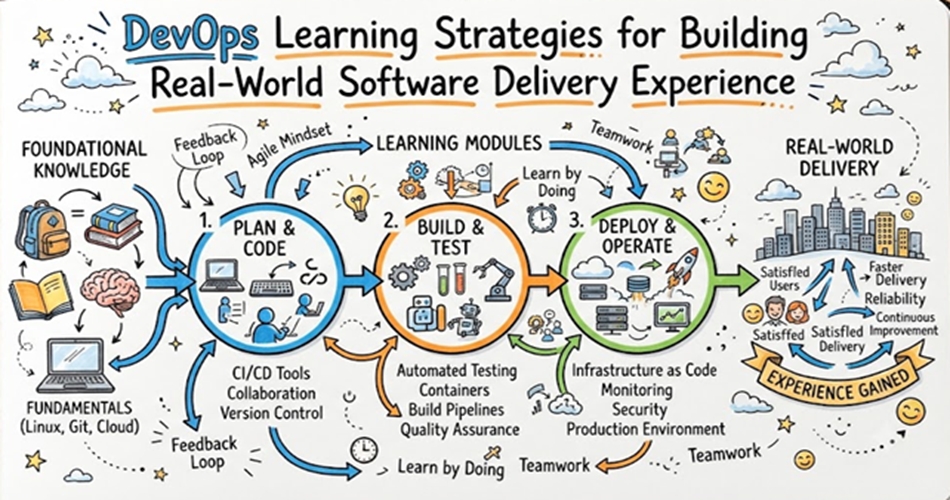
The most effective DevOps Learning Strategies combine theory with practical delivery work.
Instead of studying Jenkins, Docker, Terraform, Kubernetes, and Prometheus as separate subjects, learners should use them together in realistic projects. A simple application can become the foundation for source control, automated testing, containerization, cloud infrastructure, deployment, monitoring, and incident response.
This project-based approach helps learners understand why tools are used, how they depend on one another, and what happens when part of the delivery system fails.
This article explains how beginners and professionals can develop practical DevOps Engineer Skills through structured learning, hands-on projects, troubleshooting, collaboration, measurement, and continuous improvement.
Why Real-World DevOps Experience Matters
DevOps work is rarely limited to running commands.
In a real engineering environment, a DevOps professional may need to:
- Repair a failed pipeline
- Investigate a slow build
- Secure a cloud credential
- Correct an infrastructure configuration
- Roll back an unstable deployment
- Improve an alert
- Explain an incident timeline
- Reduce repeated manual work
- Help developers use a shared platform
- Measure delivery performance
These activities require judgement, not only tool knowledge.
A learner may know how to create a Docker image but still struggle to manage image versions. Someone may understand Terraform syntax but not know how to protect state files. A person may install Kubernetes but remain unable to diagnose why an application is unavailable.
Practical learning closes this gap.
It helps learners move from knowing individual commands to understanding complete engineering systems.
The Difference Between Tool Knowledge and Delivery Experience
Tool knowledge means understanding how a product works.
Delivery experience means understanding how that product supports a business and engineering process.
For example:
| Tool Knowledge | Real Delivery Experience |
|---|---|
| Creating a Git branch | Designing a review and release workflow |
| Writing a Dockerfile | Building secure, small, versioned images |
| Creating a Jenkins pipeline | Handling failed stages and deployment approvals |
| Writing Terraform files | Managing state, modules, reviews, and environment changes |
| Deploying to Kubernetes | Troubleshooting networking, configuration, and health checks |
| Creating a Grafana dashboard | Choosing useful service and customer indicators |
| Writing an alert rule | Reducing noise and creating clear response actions |
A complete DevOps learning plan must develop both types of knowledge.
Core Principles of Effective DevOps Learning
Learn Through One Complete Application
Choose a small application and improve its delivery process over time.
The application may include:
- A frontend
- A backend API
- A database
- User authentication
- Basic logging
- Health-check endpoints
The application does not need to be complex. The purpose is to create a realistic delivery workflow.
Build in Small Stages
Do not attempt to learn every tool at once.
Begin with version control and automated testing. Add containers, infrastructure, deployment, monitoring, and security gradually.
Each stage should solve a clear problem.
Break the System Intentionally
Troubleshooting is one of the most important DevOps Engineer Skills.
Introduce safe failures such as:
- Incorrect environment variables
- Expired credentials
- Failed tests
- Broken container ports
- Incorrect Kubernetes selectors
- Missing Terraform variables
- High memory usage
- Unhealthy application instances
Then investigate and correct the problem.
Document Every Decision
Write down:
- What was built
- Why a tool was selected
- How the process works
- What problems occurred
- How the problems were solved
- What could be improved
Documentation makes learning more structured and creates useful portfolio material.
Measure Improvement
Do not judge a project only by whether it works.
Measure:
- Build time
- Test duration
- Deployment frequency
- Recovery time
- Failure rate
- Manual steps removed
- Alert quality
- Environment-creation time
Measurement turns practice into engineering improvement.
Practical DevOps Learning Cycle
A useful learning cycle contains six stages:
1. Understand
Learn the basic concept and the problem it solves.
2. Build
Create a small working example.
3. Connect
Integrate the tool with the rest of the delivery process.
4. Break
Introduce a controlled failure.
5. Repair
Investigate logs, metrics, configuration, and recent changes.
6. Improve
Document the lesson and strengthen the process.
Repeating this cycle helps learners develop confidence and practical judgement.
Step-by-Step DevOps Learning Strategy
Step 1: Build Strong Foundations
Before using advanced DevOps tools, learn:
- Linux commands
- File permissions
- Processes and services
- Package management
- Networking basics
- DNS
- HTTP and HTTPS
- Ports and firewalls
- Git
- Basic scripting
These topics appear in almost every DevOps environment.
Practical Exercise
Create a Linux virtual machine, install a web server, configure a service, read its logs, change permissions, and troubleshoot a blocked port.
Step 2: Learn Git Through Team-Style Workflows
Do not stop after learning git add, git commit, and git push.
Practise:
- Feature branches
- Pull requests
- Code reviews
- Merge conflicts
- Release tags
- Protected branches
- Reverting changes
- Writing useful commit messages
Practical Exercise
Create two branches containing conflicting changes. Resolve the conflict, open a pull request, review it, and create a release tag.
Step 3: Automate Application Builds
Choose a CI/CD tool and automate the basic build process.
Possible tools include:
- Jenkins
- GitHub Actions
- GitLab CI/CD
- Azure Pipelines
- CircleCI
The pipeline should:
- Download the code
- Install dependencies
- Build the application
- Run tests
- Save an artifact
- Report failures clearly
Learning Goal
Understand how code changes create automated feedback.
Step 4: Add Testing and Quality Checks
Include:
- Unit tests
- Integration tests
- Code-quality checks
- Dependency checks
- Configuration validation
- Secret detection
Avoid adding every possible tool immediately. Begin with checks that provide clear value.
Practical Failure
Create a test failure and observe how the pipeline prevents the change from progressing.
Step 5: Containerize the Application
Use Docker or another container tool to package the application.
Learn:
- Dockerfiles
- Base images
- Image layers
- Build context
- Ports
- Volumes
- Networks
- Environment variables
- Registries
- Image tags
Practical Exercise
Run the application and its database using Docker Compose.
Improvement Task
Reduce the image size and avoid running the application as the root user.
Step 6: Learn Cloud Fundamentals
Select one cloud platform and understand:
- Compute
- Storage
- Networking
- Identity and access
- Managed databases
- Load balancing
- Monitoring
- Cost controls
Do not attempt to learn every service.
Focus on the services required to run the practice application.
Step 7: Automate Infrastructure
Use Terraform, OpenTofu, Pulumi, or a cloud-native Infrastructure as Code tool.
Create:
- A network
- Subnets
- Security rules
- Compute resources
- Storage
- A managed database
- Required identities
Important Learning Areas
- Variables
- Outputs
- Modules
- State
- Plans
- Reviews
- Environment separation
- Secret handling
Practical Failure
Change infrastructure manually and then study how configuration drift affects the declared state.
Step 8: Introduce Configuration Management
Use Ansible or another configuration-management tool to:
- Install packages
- Create users
- Configure services
- Copy templates
- Start applications
- Apply updates
The objective is to make server configuration repeatable.
Step 9: Build a Complete Deployment Pipeline
Extend the pipeline so it can:
- Build the application
- Run tests
- Scan dependencies
- Create a container image
- Push the image to a registry
- Deploy to a test environment
- Run verification
- Require approval
- Deploy to production
- Support rollback
This is where individual DevOps tools become a complete delivery workflow.
Step 10: Learn Kubernetes Practically
Begin with:
- Pods
- Deployments
- Services
- ConfigMaps
- Secrets
- Health checks
- Resource limits
- Ingress
- Storage
- Scaling
- Rollouts
Practical Exercise
Deploy the application and database, expose the application, add health checks, and perform a rolling update.
Troubleshooting Exercise
Break a Service selector or container port and identify why traffic cannot reach the application.
Step 11: Add Monitoring and Observability
Use tools such as:
- Prometheus
- Grafana
- OpenTelemetry
- Loki
- Elasticsearch
- Jaeger
Monitor:
- Availability
- Request rate
- Error rate
- Response time
- CPU and memory
- Database connections
- Queue length
- Deployment events
Practical Exercise
Create a dashboard and an alert for a meaningful service problem.
Step 12: Practise Incident Response
Create a simple incident process.
Include:
- Detection
- Triage
- Ownership
- Communication
- Mitigation
- Recovery
- Verification
- Review
Simulate a failed deployment and record the timeline from detection to recovery.
DevOps Learning Tools Comparison
| Learning Area | Useful Tools | Main Skill Developed | Beginner Priority |
|---|---|---|---|
| Source control | Git, GitHub, GitLab | Collaboration and change tracking | Very high |
| CI/CD | Jenkins, GitHub Actions, GitLab CI/CD | Build and delivery automation | Very high |
| Containers | Docker, Podman | Consistent application packaging | High |
| Cloud | AWS, Azure, Google Cloud | Infrastructure and managed services | High |
| Infrastructure as Code | Terraform, OpenTofu | Repeatable infrastructure | High |
| Configuration | Ansible | System automation | Medium |
| Orchestration | Kubernetes | Container operations | Medium to high |
| Monitoring | Prometheus, Grafana | Service-health visibility | High |
| Logging | Loki, OpenSearch, Elasticsearch | Troubleshooting | High |
| Tracing | OpenTelemetry, Jaeger | Request investigation | Medium |
| Security | Trivy, SonarQube, Vault | DevSecOps practices | High |
| Engineering intelligence | DevOpsIQ | Delivery and reliability measurement | Medium to high |
Learning Strategies That Produce Better Results
Use Project-Based Learning
Every important concept should be applied to a project.
A tutorial may explain a pipeline, but a project forces the learner to manage files, permissions, failures, dependencies, and environment differences.
Use Spaced Practice
Return to important tasks regularly.
For example, build several pipelines for different application types instead of completing one pipeline and never reviewing it again.
Explain Concepts in Your Own Words
After completing a task, explain:
- What the tool does
- Why it was used
- What alternatives exist
- What failed
- What was improved
Teaching or explaining a concept exposes gaps in understanding.
Read Logs Before Searching for Answers
When something fails, first inspect:
- Application logs
- Pipeline output
- System logs
- Kubernetes events
- Terraform plans
- Monitoring data
- Recent configuration changes
This builds independent troubleshooting ability.
Rebuild Projects Without Instructions
After completing a guided tutorial, rebuild the project without copying the original steps.
This shows whether the knowledge is truly understood.
Review Architecture Decisions
Ask:
- Was this tool necessary?
- Could the process be simpler?
- Is the system secure?
- Can the deployment be reversed?
- Who would operate this in production?
- What happens when a dependency fails?
Common DevOps Learning Mistakes
| Mistake | Why It Causes Problems | Better Approach |
|---|---|---|
| Learning too many tools together | Concepts become mixed and confusing | Learn one delivery layer at a time |
| Copying commands without understanding | Learners cannot troubleshoot failures | Explain every major command and configuration |
| Avoiding errors | Troubleshooting skills remain weak | Create controlled failures |
| Building only local projects | Cloud and networking gaps remain hidden | Deploy projects into realistic environments |
| Ignoring security | Unsafe habits become normal | Add security from the beginning |
| Skipping documentation | Knowledge becomes difficult to repeat | Maintain project notes and diagrams |
| Focusing only on installation | Tool purpose remains unclear | Connect each tool to a delivery problem |
| Chasing certifications only | Practical confidence remains limited | Combine certification study with projects |
| Using overly complex projects | Learning slows because too many problems appear | Begin small and expand gradually |
| Ignoring measurement | Improvement remains based on opinion | Track delivery and reliability indicators |
Benefits of Practical DevOps Learning
Stronger Troubleshooting Skills
Real projects expose configuration, networking, access, dependency, and deployment problems.
Better Tool Selection
Learners begin to understand when a tool is helpful and when it adds unnecessary complexity.
Improved Interview Performance
Candidates with practical experience can explain decisions, failures, and improvements instead of repeating memorized definitions.
Greater Job Readiness
Practical projects reflect the type of work performed in DevOps, SRE, cloud, and platform-engineering roles.
Better Technical Communication
Documentation and project reviews improve the ability to explain systems to developers, managers, and operations teams.
Clearer Career Direction
Hands-on practice helps learners discover whether they prefer automation, cloud infrastructure, security, reliability, observability, or platform engineering.
Real-World Learning Example
A learner creates a simple online appointment application.
The first version runs locally. The learner places the code in Git and introduces branches and pull requests.
Next, a CI pipeline runs tests whenever code is changed. Docker packages the application and database into repeatable environments.
Terraform creates cloud networking, computing, and storage. The application is then deployed to Kubernetes.
Prometheus collects application metrics, while Grafana displays request volume, errors, latency, and resource use.
The learner intentionally deploys a version containing an incorrect database configuration. The application becomes unhealthy.
By reviewing Kubernetes events, container logs, deployment history, and monitoring data, the learner identifies the problem and rolls back the release.
The learner then adds configuration validation to the pipeline.
This single project creates experience in source control, CI/CD, containers, Infrastructure as Code, Kubernetes, monitoring, troubleshooting, rollback, and continuous improvement.
Real-World Use Cases
Beginners
Beginners can use small projects to understand how tools connect without needing access to a large enterprise environment.
Working Developers
Developers can learn how their code moves through testing, packaging, deployment, and production monitoring.
System Administrators
Administrators can move from manual server management toward automation, Infrastructure as Code, and cloud operations.
QA Professionals
Testing professionals can learn automated quality checks, pipeline integration, environment creation, and release validation.
Engineering Teams
Teams can create shared laboratories for pipeline templates, deployment methods, incident exercises, and platform testing.
Organizations
Companies can use internal practice environments to prepare employees before they manage important production systems.
Practical DevOps Roadmap
Foundation Stage
Learn Linux, networking, Git, and scripting.
Expected outcome: Ability to navigate systems, investigate basic issues, and manage code.
Automation Stage
Learn CI/CD, testing, and artifact management.
Expected outcome: Ability to automate software builds and validation.
Packaging Stage
Learn Docker and container registries.
Expected outcome: Ability to create consistent application packages.
Infrastructure Stage
Learn cloud platforms, Terraform, and Ansible.
Expected outcome: Ability to create and configure repeatable environments.
Orchestration Stage
Learn Kubernetes and GitOps.
Expected outcome: Ability to deploy and manage containerized workloads.
Reliability Stage
Learn observability, SLOs, incident response, and recovery.
Expected outcome: Ability to monitor services and respond to failures.
Measurement Stage
Learn DORA metrics, delivery analysis, and engineering intelligence.
Expected outcome: Ability to identify bottlenecks and improvement opportunities.
Essential DevOps Engineer Skills
Technical Skills
- Linux administration
- Networking
- Git
- Bash or Python
- CI/CD
- Docker
- Kubernetes
- Cloud platforms
- Terraform
- Ansible
- Monitoring
- Logging
- Security
- Troubleshooting
Practical Engineering Skills
- Breaking large problems into smaller tasks
- Reading technical logs
- Comparing tool options
- Designing rollback processes
- Managing configuration
- Investigating dependencies
- Measuring improvement
- Reviewing failures without blame
Professional Skills
- Communication
- Documentation
- Collaboration
- Incident coordination
- Time management
- Risk awareness
- Continuous learning
DevOps Projects for Real Experience
Project 1: Linux Service Deployment
Install, configure, secure, and monitor a web application on a Linux server.
Project 2: CI Pipeline
Create an automated build and testing process triggered by repository changes.
Project 3: Containerized Application Stack
Run a frontend, API, and database with Docker Compose.
Project 4: Infrastructure Automation
Provision a cloud environment using Terraform modules and remote state.
Project 5: Kubernetes Delivery
Deploy an application with health checks, scaling, configuration, and rolling updates.
Project 6: Monitoring Platform
Create dashboards and alerts using Prometheus and Grafana.
Project 7: Secure Delivery Pipeline
Add code-quality checks, dependency scanning, image scanning, and secret detection.
Project 8: Incident Simulation
Create a failed deployment, investigate it, recover the service, and write an incident review.
Project 9: GitOps Deployment
Use Argo CD or Flux to manage Kubernetes changes through Git.
Project 10: Engineering Metrics Dashboard
Connect repository, CI/CD, deployment, incident, and reliability data.
Best DevOps Course and Certification Strategy
A useful Best DevOps Course should include:
- Guided laboratories
- Real repositories
- Delivery pipelines
- Container projects
- Cloud environments
- Infrastructure as Code
- Kubernetes troubleshooting
- Monitoring exercises
- Security checks
- Incident simulations
- End-to-end projects
Certifications can support structured learning in areas such as:
- Cloud computing
- Kubernetes
- Linux
- Terraform
- Security
- Site Reliability Engineering
However, the Best DevOps Certifications should be supported by practical projects.
A learner should be able to explain how the technology was used, what failed, and how the project was improved.
Career Opportunities
DevOps Engineer
Automates software building, testing, infrastructure, deployment, and monitoring.
Site Reliability Engineer
Improves service reliability using automation, observability, SLOs, and incident management.
Platform Engineer
Creates shared tools, templates, and self-service delivery platforms.
Cloud Engineer
Builds and operates cloud infrastructure, networking, identity, and managed services.
DevSecOps Engineer
Integrates security controls into application and infrastructure workflows.
Observability Engineer
Develops metrics, logging, tracing, alerting, and troubleshooting systems.
Engineering Productivity Engineer
Improves developer workflows, builds, tests, pipelines, and feedback systems.
DevOps Engineer Salary Factors
DevOps Engineer Salary levels can vary according to:
- Country and city
- Professional experience
- Cloud knowledge
- Linux and networking skills
- CI/CD experience
- Kubernetes knowledge
- Security responsibilities
- Troubleshooting ability
- Industry
- Organization size
- Communication skills
- Leadership responsibilities
Practical experience can make a candidate more valuable because it demonstrates the ability to solve real delivery problems.
DORA Metrics for Learning Projects
DORA metrics can also be used in personal and training projects.
Deployment Frequency
Track how often the project is successfully deployed.
Change Lead Time
Measure how long a change takes to move from commit to deployment.
Change-Failure Rate
Record how many releases require correction, rollback, or urgent repair.
Recovery Time
Measure how long it takes to restore the application after a failed change.
Deployment Rework
Track unplanned deployments created to correct production issues.
| Metric | Learning Question |
|---|---|
| Deployment frequency | Can the project be released regularly? |
| Change lead time | Where does the delivery process wait? |
| Change-failure rate | Which validation step is missing? |
| Recovery time | Is rollback simple and documented? |
| Deployment rework | Are repeated problems being prevented? |
Metrics should be used to improve the delivery system, not to create artificial scores.
How BestDevOps Supports Practical Learning
BestDevOps can help learners explore:
- DevOps tutorials
- Structured roadmaps
- Tool comparisons
- Practical projects
- Certification guidance
- Course information
- Interview preparation
- Salary insights
- Cloud technologies
- Kubernetes
- CI/CD
- Infrastructure as Code
- DevSecOps
- SRE and platform engineering
These resources can help learners understand both individual technologies and the wider software delivery process.
How DevOpsIQ Supports Learning Through Measurement
DevOpsIQ can extend practical DevOps learning by connecting information from repositories, CI/CD pipelines, project systems, monitoring tools, and incident platforms.
Learners and engineering teams can use this type of connected view to understand:
- How frequently changes are released
- Where delivery becomes delayed
- Which deployments create failures
- How quickly recovery happens
- Whether reliability targets are being achieved
- Which services need improvement
The Pulse Score can provide a summarized view of service health.
It should be reviewed with the underlying deployment, incident, SLO, recovery, and service information rather than used alone.
DevOps Interview Questions and Answers
1. How can a beginner gain practical DevOps experience?
A beginner can build one application and gradually add source control, CI/CD, containers, cloud infrastructure, deployment, monitoring, and security.
2. Why is project-based learning important in DevOps?
Projects force learners to connect tools, manage failures, and solve real delivery problems.
3. What should a first DevOps project include?
It should include version control, automated testing, packaging, deployment, and basic monitoring.
4. Why should learners create controlled failures?
Controlled failures build troubleshooting, recovery, and incident-response skills.
5. What is the value of documenting DevOps projects?
Documentation explains architecture, decisions, problems, solutions, and learning outcomes.
6. How can Git be practised realistically?
Use branches, pull requests, reviews, merge conflicts, tags, and reverts.
7. What makes a CI/CD project realistic?
It should build, test, scan, package, deploy, verify, and support recovery.
8. Why should one application be used across multiple learning stages?
It shows how tools connect across the complete software delivery lifecycle.
9. What is configuration drift?
Configuration drift happens when real environments no longer match their approved definitions.
10. Why is rollback practice important?
Teams must be able to recover quickly when a deployment creates production problems.
11. How can monitoring improve a learning project?
Monitoring shows application behaviour and provides evidence during troubleshooting.
12. What should learners measure in a pipeline?
They can measure duration, failure rate, waiting time, deployment frequency, and recovery time.
13. Why is Kubernetes not always the first DevOps tool to learn?
It depends on knowledge of Linux, networking, containers, configuration, and application deployment.
14. How can learners improve troubleshooting ability?
They should inspect logs, events, metrics, configuration, dependencies, and recent changes before searching for solutions.
15. What is a useful DevOps portfolio?
It includes working projects, source code, diagrams, documentation, failures, improvements, and measurable results.
16. Can certifications replace project experience?
No. Certifications support structured learning, but projects demonstrate practical application.
17. What is an SLO?
An SLO is a measurable reliability target for a service.
18. How can DORA metrics help learners?
They show whether a project’s delivery process is becoming faster, safer, and easier to recover.
19. What is the role of security in DevOps learning?
Security should be included in code, dependencies, containers, infrastructure, secrets, and access controls.
20. How should a learner choose DevOps tools?
Choose tools according to the project problem, learning goal, complexity, integrations, and available environment.
Future Trends in DevOps Learning
Cloud-Based Practice Environments
More learners are using temporary cloud laboratories instead of maintaining permanent infrastructure.
Platform Engineering Skills
DevOps learners increasingly need to understand reusable platforms and self-service delivery workflows.
AI-Assisted Troubleshooting
AI tools may help summarize logs, explain errors, and suggest investigation paths. Learners still need to verify the results.
Security-Focused Learning
Software supply-chain security, secret protection, access control, and policy automation are becoming more important.
Observability-Driven Practice
Training projects are beginning to include metrics, logs, traces, SLOs, and incident exercises.
Engineering Intelligence
Learning is moving beyond tool installation toward understanding delivery speed, reliability, developer experience, and service performance.
Frequently Asked Questions
1. Can DevOps be learned without professional experience?
Yes. Personal projects, cloud laboratories, open-source work, and incident simulations can provide meaningful practical experience.
2. How many tools should a beginner learn initially?
Start with a small group: Git, one CI/CD tool, Docker, one cloud platform, Terraform, and basic monitoring.
3. How long should one DevOps project take?
The duration depends on its scope. It is better to complete a small working project than to leave a large project unfinished.
4. Should beginners learn AWS, Azure, or Google Cloud?
Choose one platform first. The main cloud concepts can later be transferred to other providers.
5. Is programming required for practical DevOps learning?
Advanced development is not always required, but Bash or Python scripting is highly useful.
6. Should every project use Kubernetes?
No. Use Kubernetes when the learning goal includes orchestration. Simpler projects can use virtual machines or managed container services.
7. How can a learner show troubleshooting skills?
Document the problem, evidence, investigation process, root cause, solution, and preventive improvement.
8. Are home laboratories useful for DevOps?
Yes. Local virtual machines and containers are useful for Linux, networking, automation, and Kubernetes practice.
9. How should DevOps projects be presented in a portfolio?
Include a clear overview, architecture diagram, tools, workflow, repository, challenges, solutions, and results.
10. Is it necessary to learn every DevOps tool?
No. Learn the concepts and gain depth in a practical set of tools.
11. How can learners avoid tutorial dependency?
Rebuild projects without instructions, change the requirements, and troubleshoot new failures.
12. What is the best sign of real DevOps progress?
The learner can independently design, operate, troubleshoot, explain, and improve a complete delivery process.
Key Takeaways
- Practical experience requires more than watching tutorials.
- One small application can support an entire DevOps learning journey.
- Tools should be learned as parts of a connected delivery system.
- Controlled failures build valuable troubleshooting skills.
- Documentation turns projects into stronger learning and portfolio resources.
- DevOps projects should include testing, security, monitoring, and recovery.
- DORA metrics can help measure improvement in training projects.
- Certifications work best when combined with practical experience.
- BestDevOps supports structured learning, while DevOpsIQ supports connected engineering measurement.
Conclusion
Effective DevOps Learning Strategies must help learners move from understanding individual tools to managing a complete software delivery process.
Watching tutorials and reading documentation provide a useful starting point, but practical experience comes from building, connecting, breaking, repairing, and improving real systems.
A learner can begin with one simple application. Git can manage its source code, a CI/CD platform can automate testing, Docker can package it, Terraform can create infrastructure, and Kubernetes can manage deployment. Monitoring and logging tools can then provide visibility into its production behaviour.
The most valuable learning happens when something goes wrong. A failed test, incorrect container setting, broken deployment, missing permission, or noisy alert creates an opportunity to develop real troubleshooting ability.
Learners should document these problems and explain how they were solved. This creates stronger understanding and demonstrates practical ability to employers.
A structured DevOps Roadmap should begin with Linux, networking, Git, and scripting before advancing into CI/CD, containers, cloud, Infrastructure as Code, Kubernetes, security, observability, and engineering intelligence.
BestDevOps can support this journey through tutorials, roadmaps, tool comparisons, courses, projects, certifications, and interview preparation. DevOpsIQ can help learners and teams understand how deployments, incidents, recovery, SLOs, and service health connect.
The goal is not to memorize more tools. The goal is to confidently build, operate, troubleshoot, and improve a reliable software delivery system.
